MTF Scalp Sniper
A fast moving-average crossover, allowed through only when a higher timeframe and the current volatility both agree.
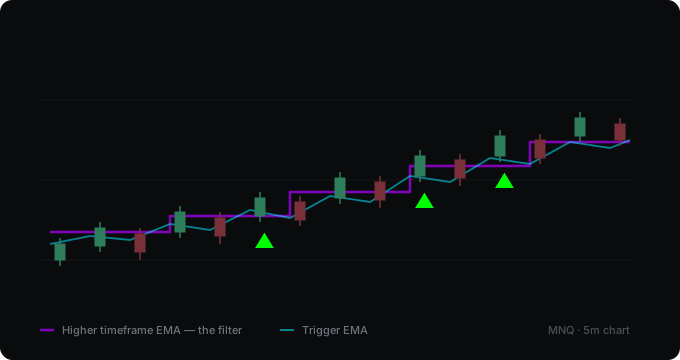
What it computes
Three things have to line up. Price crosses a short exponential moving average on the chart you are watching — that is the trigger. Price is on the same side of a longer exponential moving average taken from a higher timeframe — that is the direction filter. And the average true range is above its own longer-term average — that is the volatility filter. When all three agree, an arrow is drawn below or above the bar. Both moving averages are drawn on the chart, so the filters are visible rather than hidden in the logic.
What it assumes
That a crossover is worth more when it goes with the bigger picture than against it, and that in a dead market most crossovers are noise. Neither is a law — plenty of good moves start against the higher timeframe, and plenty start in quiet conditions. The filters trade those away for fewer and more consistent signals. What it does not claim: an arrow is not an entry. It marks that three conditions lined up, nothing more.
Where it falls short
- The higher-timeframe filter lags by definition. At a genuine turn it will be on the wrong side for a while and will block the first signals of the new move — which are often the best ones.
- With confirmed bars on, the filter steps instead of gliding. An hourly average changes once an hour, not every minute. That is correct, but it means the filter can sit in a stale place for most of an hour.
- The volatility filter cuts both ways. It keeps the script quiet in dead periods, and it also keeps it quiet at the start of a move, before the range has had time to expand.
- A nine-period average is crossed often. The cooldown stops the worst of the clustering, but in a choppy range you will still see arrows that lead nowhere.
Backtest
There is none. The script gives no stop and no target, so there is nothing to measure: an arrow on its own has no outcome. A complete rule built on it could be measured, and that would be a separate tool published with its results.
Settings
| Setting | What it does |
|---|---|
| Higher timeframe | Which timeframe the direction filter comes from, and the length of its average. |
| Use only closed higher-timeframe bars | On by default, so the historical chart matches what you would have seen live. |
| Trigger EMA length | Shorter means more signals. |
| Minimum bars between signals | Stops signals from clustering on a single swing. |
| Volatility filter | Requires ATR to be above its own average. Both lengths adjustable. |
| Show the two moving averages | Can be switched off, but then the filters are invisible again. |
Changelog
v2.0
Both moving averages are now drawn on the chart. Before this the script showed arrows and nothing else: there was no way to see where the higher-timeframe filter sat, which meant no way to understand why a signal fired or why one was held back. New option, on by default: use only closed higher-timeframe bars — the filter used to update while the hourly bar was still forming, so a signal visible in hindsight might not have been there at the time. A warning appears when the selected higher timeframe is lower than the chart, which makes the whole filter meaningless. Alerts were added — there were none, so the signals could not be used in an alert at all. Plus a cooldown between signals, adjustable ATR lengths, and configurable colours.
v1.0
First release.
How to get it
Open source and free on TradingView. Add it to your chart from the link below — no account needed here.
Open on TradingView