Master Suite
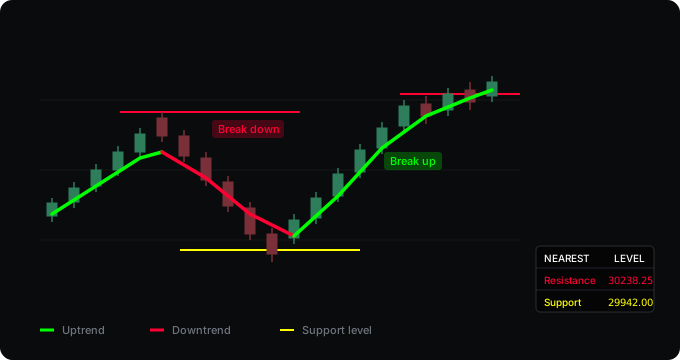
A trend line and a self-cleaning set of support and resistance levels, with a panel showing the nearest level in each direction.
What it computes
Three things at once. The trend line is a Hull moving average from a timeframe you choose, green when price is above it and red when below. The levels come from pivots: each confirmed swing high becomes a resistance line, each swing low a support line, drawn from where it formed and extended to the present. When price closes through a level, that line is deleted and a break marker is left behind — so what stays on the chart is only what has not yet been taken out. A small panel in the corner shows the nearest untouched level above and below the current price.
What it assumes
That a level matters until price closes through it, and stops mattering after. That is why the lines delete themselves: a resistance that has been taken out is no longer resistance. The trend line is there as a filter, not a signal — it tells you which side of the average the market is on, nothing more. What it does not claim: it cannot see orders, and a break is not a prediction that the move continues. Plenty of breaks fail.
Where it falls short
- Levels appear late. A pivot is only confirmed a set number of bars after the high or low — ten by default. That delay cannot be removed without guessing.
- A break on a closing basis is a choice, not a law. Price can wick far through a level and close back inside, and the script will not call that a break. On some instruments that is right, on others you will feel it is too slow.
- Older levels are dropped once the limit is reached. The default is twenty active levels. If you work with long-standing levels from weeks back, raise it — but the chart gets busier and the script slower.
- In a tight range the trend line colour flips often and means little. Raise the smoothing length or move the trend timeframe higher.
Backtest
There is none. This tool marks structure and filters direction; it gives no entry rule, so there is nothing to measure. A rule built on it — for example, only taking breaks in the direction of the line — could be measured, and that would be a separate tool published with its results.
Settings
| Setting | What it does |
|---|---|
| Smoothing length | Length of the Hull moving average. |
| Trend timeframe | Which timeframe the line is calculated on. Empty means the chart's own. |
| Use only closed higher-timeframe bars | On by default, so the historical chart matches what you would have seen live. |
| Pivot lookback | How many bars must be lower on each side. This is also the delay. |
| Maximum active levels | Older levels are dropped at this limit. Keeps the chart readable and the script fast. |
| Break label distance | Measured in ATR, so it works the same on any instrument. |
| Alerts | Trend crosses in either direction, and resistance or support breaks. |
Changelog
v2.2
Break labels now sit on the side the move came from — an upward break below the bar, a downward break above it. Marking where price came from reads better than marking where it is heading.
v2.1
Break labels moved clear of the candles. They used to sit at the level price, inside the price action, where the candles covered them. The distance now scales with ATR and is adjustable.
v2.0
Levels used to accumulate without limit — only a break removed one, so anything that never broke stayed forever, slowing the script down on long charts. There is now a maximum. Levels that price had already passed by the time the pivot confirmed are no longer created; they used to flash on the chart and vanish with a break marker. New option, on by default: use only closed higher-timeframe bars. Plus alerts, tick-accurate prices in the panel, a warning when the trend timeframe is lower than the chart, and configurable colours.
v1.0
First release.
How to get it
Open source and free on TradingView. Add it to your chart from the link below — no account needed here.
Open on TradingView